
Last updated on
Nov 9, 2026
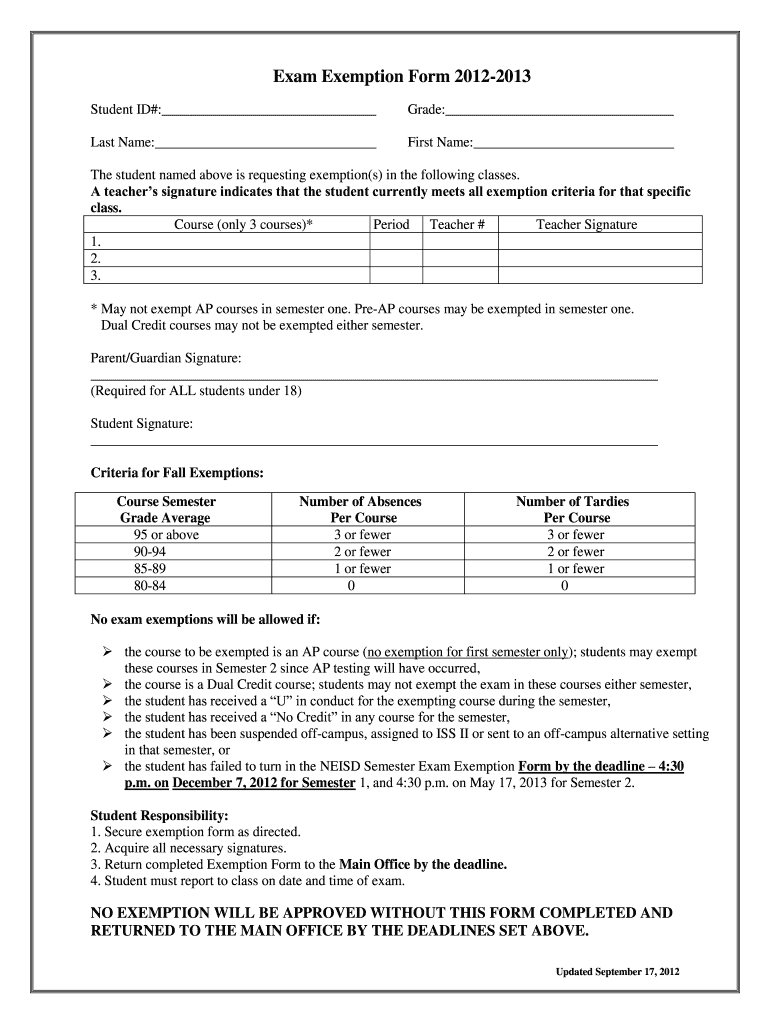
NEISD Exam Exemption Form 2012-2026 free printable template
pdfFiller is not affiliated with any government organization

Fill out
Complete the form online in a simple drag-and-drop editor.

eSign
Add your legally binding signature or send the form for signing.

Share
Share the form via a link, letting anyone fill it out from any device.

Export
Download, print, email, or move the form to your cloud storage.
Why pdfFiller is the best tool for your documents and forms


End-to-end document management
From editing and signing to collaboration and tracking, pdfFiller has everything you need to get your documents done quickly and efficiently.
Accessible from anywhere
pdfFiller is fully cloud-based. This means you can edit, sign, and share documents from anywhere using your computer, smartphone, or tablet.
Secure and compliant
pdfFiller lets you securely manage documents following global laws like ESIGN, CCPA, and GDPR. It's also HIPAA and SOC 2 compliant.
What is NEISD Exam Exemption Form
The Exam Exemption Form 2012-2013 is an education document used by students to request exemptions from final exams for specific courses.
pdfFiller scores top ratings on review platforms




Who needs NEISD Exam Exemption Form?
Explore how professionals across industries use pdfFiller.

NEISD Exam Exemption Form is needed by:
-
High school students seeking exam exemptions
-
Parents or guardians of students requesting exemptions
-
Teachers responsible for signing exemption requests
Comprehensive Guide to NEISD Exam Exemption Form
What is the Exam Exemption Form 2?
The Exam Exemption Form 2 is a key document used in educational settings, allowing students to request exemptions from final exams for specific courses. It is crucial for students, parents/guardians, and teachers as it fosters a supportive academic environment by addressing unique student needs. This form plays a significant role in reducing examination stress and provides a streamlined approach for handling requests for exemptions.
Typically, students who have demonstrated consistent academic performance or face challenging circumstances will need to fill out the exam exemption form 2. The importance of this form cannot be overstated, as it not only helps manage academic pressures but also supports student well-being.
Purpose and Benefits of the Exam Exemption Form
The primary rationale for requesting an exam exemption lies in the acknowledgment of individual academic needs. This exam exemption form provides numerous benefits for students, parents, and teachers alike. Students can experience reduced anxiety and enhanced focus on their studies without the repetitive stress of looming exams.
-
It facilitates tailored educational experiences for students.
-
Parents/guardians can ensure that their children's educational outcomes are prioritized.
-
Teachers benefit from maintaining a manageable classroom environment.
-
This supporting document also offers flexibility in education, allowing for academic adjustments.
Eligibility Criteria for the Exam Exemption Form
Eligibility for the exam exemption form hinges on specific criteria that students must meet. Students typically need to maintain satisfactory grade averages and demonstrate positive attendance records to qualify for exemptions. Additionally, there are restrictions concerning which courses may be eligible for exemption.
-
Students must meet semester exam exemption criteria established by the school.
-
A completed student signature exemption form is required.
How to Fill Out the Exam Exemption Form 2 Online
Filling out the Exam Exemption Form 2 online is straightforward if you follow these steps:
-
Start by accessing the digital form from the designated platform.
-
Carefully enter the student's details, including their name and ID.
-
Complete the sections for parent/guardian and teacher signatures.
-
Review all information for accuracy before submission.
Common errors to avoid include leaving mandatory fields blank and not ensuring all necessary signatures are obtained. Adherence to these guidelines will ensure a smooth form submission process.
Review and Validation Checklist for the Exam Exemption Form
Before submitting the Exam Exemption Form, it's vital to complete a thorough review. Here’s a checklist to guide you:
-
Verify that all sections of the form are filled accurately.
-
Ensure that the student, parent/guardian, and teacher signatures are provided.
-
Check eligibility criteria against school policies.
-
Double-check all details for validity to avoid errors during submission.
This validation phase is crucial to preventing complications that could arise from incomplete forms.
How to Submit the Exam Exemption Form 2
Submitting the completed Exam Exemption Form 2 can typically be done via the school's designated methods. Be mindful of deadlines for submission as they vary by institution.
-
Forms are generally submitted to the main office or designated online portal.
-
Timely filing is essential to avoid missing out on exemptions.
-
After submission, keep a confirmation of receipt from the office.
Consequences of Not Filing or Late Filing
Students who fail to submit the Exam Exemption Form on time may face several consequences:
-
Missing out on the opportunity for exam exemptions.
-
Potential negative impacts on academic performance as deadlines are strictly enforced.
-
Common reasons for filing delays can include oversight, lack of understanding of the process, or responsibilities outside of school.
Understanding these consequences is essential for students and parents/guardians to maintain academic integrity.
Security and Compliance for Exam Exemption Forms
When handling sensitive documents like the Exam Exemption Form, strong security measures are paramount. The online filling process is safeguarded through various protocols, ensuring compliance with regulations such as HIPAA and GDPR.
-
High-level encryption is employed to protect user data.
-
Data handling practices meet rigorous security standards to preserve privacy.
Why Use pdfFiller for the Exam Exemption Form?
Utilizing pdfFiller to manage the Exam Exemption Form offers several advantages. The platform is designed with ease of use in mind, enabling users to fill out and submit forms efficiently.
-
Features include eSigning, which simplifies the signing process.
-
Cloud storage enhances accessibility without the need for downloads.
-
Robust security measures further assure users while managing sensitive documents.
Get Started with Your Exam Exemption Form
Begin the process of completing your Exam Exemption Form today using pdfFiller. The platform allows access from any device with no downloads required. Once familiar, you can efficiently fill out this education exemption form pdf and proceed with your academic needs.
How to fill out the NEISD Exam Exemption Form
-
1.Access pdfFiller and log in to your account or create a new one if needed.
-
2.In the search bar, type 'Exam Exemption Form 2012-2013' to quickly locate the document.
-
3.Once the form is open, review the sections and instructions provided to ensure you understand what information is required.
-
4.Gather necessary information like your student ID, name, grade, and the details of the courses you wish to seek exemptions for.
-
5.Start by filling in your personal details in the designated fields, ensuring accuracy in your name and ID.
-
6.Follow the prompts to input the specific courses for which you are requesting an exemption.
-
7.Request a teacher’s signature by either printing the form for them to sign or using the e-signature feature if available.
-
8.If you are a parent or guardian, make sure to sign the form where indicated.
-
9.Once everything is filled out, review each section to confirm that all required information is complete and correct.
-
10.Take advantage of pdfFiller’s preview function to see how the finished document will appear.
-
11.After confirming all details are accurate, save your changes in pdfFiller.
-
12.You can download the completed form to your device or submit it electronically, following your institution's submission process.
-
13.Finally, ensure the completed form is submitted to your main office before the deadline specified.

Who is eligible to submit the Exam Exemption Form 2012-2013?
High school students who believe they meet specific criteria for exemption from final exams can submit this form. It requires signatures from parents/guardians and teachers.
What are the deadlines for submitting the Exam Exemption Form?
The form must be submitted by set deadlines outlined by the school. As the form is from 2012-2013, it's advisable to check with your school for current deadlines.
How should the completed form be submitted?
Completed forms should be submitted to the main office of your school. Check if electronic submissions are allowed or if a physical copy is required.
What supporting documents are needed with the form?
While specific supporting documents aren’t detailed in the metadata, typically, you may need proof of course grades or attendance records to support your exemption request.
What common mistakes should I avoid when filling out the form?
Ensure that all signatures are obtained before submission. Double-check that you have completed all required fields and that all information is accurate to prevent processing delays.
How long does it take for the form to be processed?
Processing times can vary by institution. It's best to inquire with your school’s administration regarding how long it usually takes to review and approve exemption requests.
What should I do if I have questions about filling out the form?
If you have specific questions, reach out to your school’s guidance office or administration. They can provide assistance related to the Exam Exemption Form and its requirements.
Related Content
Related Forms



Related Catalogs
Get the latest insights from our blog


If you believe that this page should be taken down, please follow our DMCA take down process
here
.
This form may include fields for payment information. Data entered in these fields is not covered by PCI DSS compliance.